Descript podcast campaign ideas that work
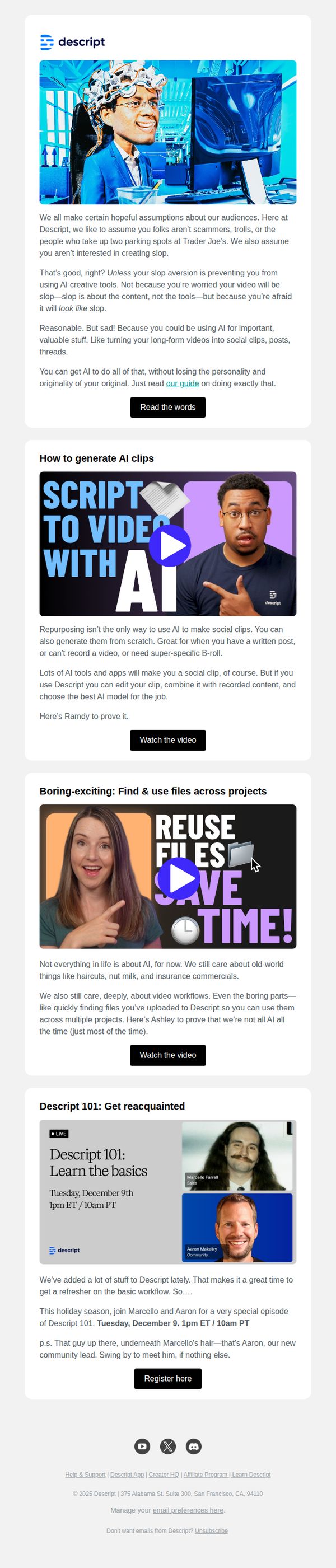


1. The no-slop guide to AI repurposing
Objective
This email aims to educate users on how to repurpose content intelligently using Descript’s AI tools without sacrificing authenticity, while also driving engagement through video tutorials and a live educational webinar.
Why this works
The email opens with a disarmingly honest tone that acknowledges user skepticism about AI, immediately building trust by validating their fear of 'slop' while reframing AI as a tool for preserving personality and originality.
How to implement
Each section is anchored by a compelling video thumbnail with bold, benefit-driven headlines like 'Script to Video with AI' and 'Reuse Files, Save Time!', making complex features feel accessible and immediately useful without overwhelming the reader.
Pro Tip
The primary CTA 'Read the words' is vague and underwhelming for a guide-focused email; replacing it with 'Get the No-Slop AI Guide' would better reflect the value proposition and increase click-through intent. • The email lacks a visual hierarchy that guides the eye from problem → solution → action; adding subtle dividers or background color shifts between sections would improve scannability and reinforce the narrative flow.
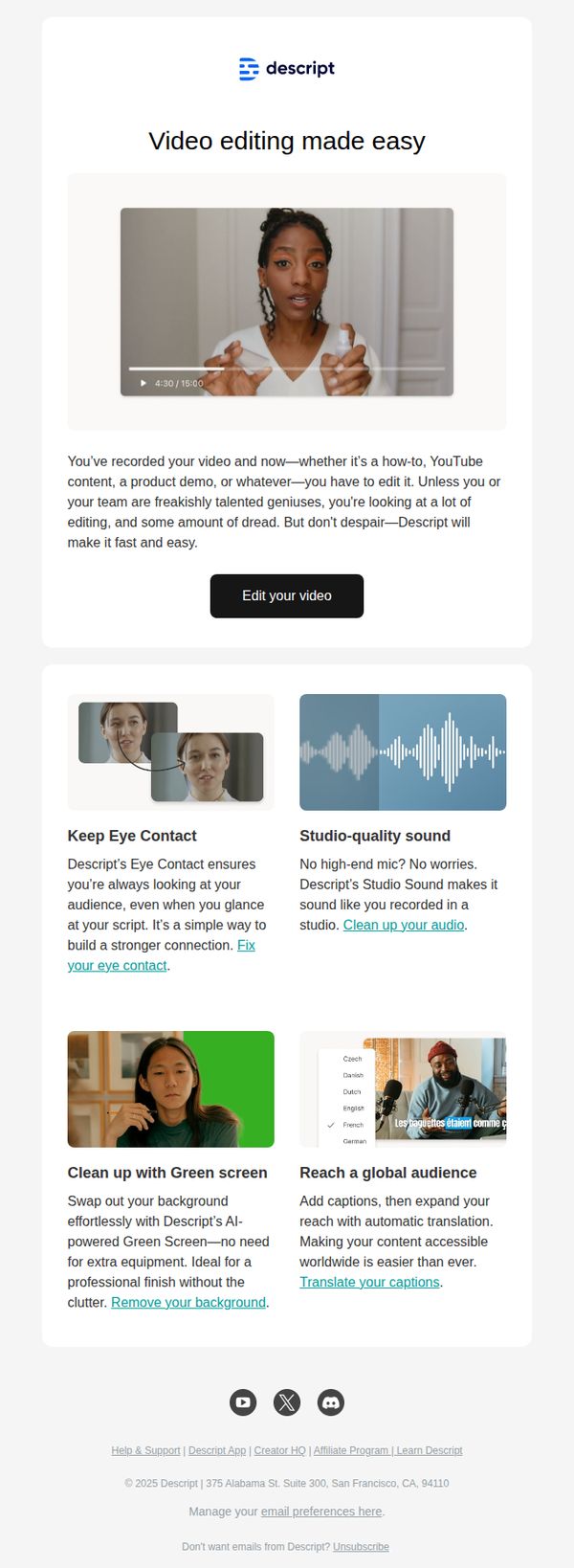
2. Edit your how-to videos like a pro in just a few clicks
Objective
The email aims to convert viewers who’ve recorded how-to or tutorial videos into Descript users by showcasing how the platform simplifies editing with AI-powered tools, reducing friction and perceived effort. It positions Descript as the effortless solution for non-professionals overwhelmed by traditional video editing.
Why this works
Descript brilliantly frames video editing as a pain point rather than a creative process, speaking directly to overwhelmed creators who dread post-production, this emotional hook makes the solution feel urgent and necessary, not just convenient.
How to implement
Each feature is presented as a solved problem, eye contact, audio quality, green screen, translation, not just a tool, which transforms technical capabilities into relatable user benefits that resonate with non-technical audiences seeking simplicity and professionalism.
Pro Tip
Add a subtle countdown timer or urgency trigger near the CTA (e.g., 'Start editing in 30 seconds, no download required') to reduce hesitation and reinforce the 'fast and easy' promise visually, not just textually. • Include a micro-testimonial or social proof badge under the hero video (e.g., 'Used by 500K+ creators') to build trust early, since the audience may be skeptical of AI editing claims without validation from peers.
3. The timeline is on, the teleprompter is here, and so is video regenerate
Objective
This email aims to inform existing users about Descript’s latest product updates, particularly the new timeline, teleprompter, and video regenerate features, while encouraging immediate exploration and adoption through clear CTAs and visual demos. It also reinforces brand excitement by positioning these tools as essential for modern video creators.
Why this works
The email opens with a punchy, benefit-driven subject line that mirrors the product’s creative energy, immediately signaling to users that this isn’t just another update, it’s a game-changer for video production workflows.
How to implement
Each feature is introduced with a bold headline, followed by a concise explanation and a visual demo, making complex tools feel intuitive and instantly valuable without overwhelming the reader with technical jargon.
Pro Tip
Add a visual progress bar or checklist near the top to show users how many new features they’ve tried versus those still unexplored, creating a sense of momentum and encouraging deeper engagement with the update suite. • Include a short testimonial or user quote under the 'Video Regenerate' section to validate the feature’s real-world impact, especially since it’s in beta, helping skeptical users overcome hesitation and try it themselves.
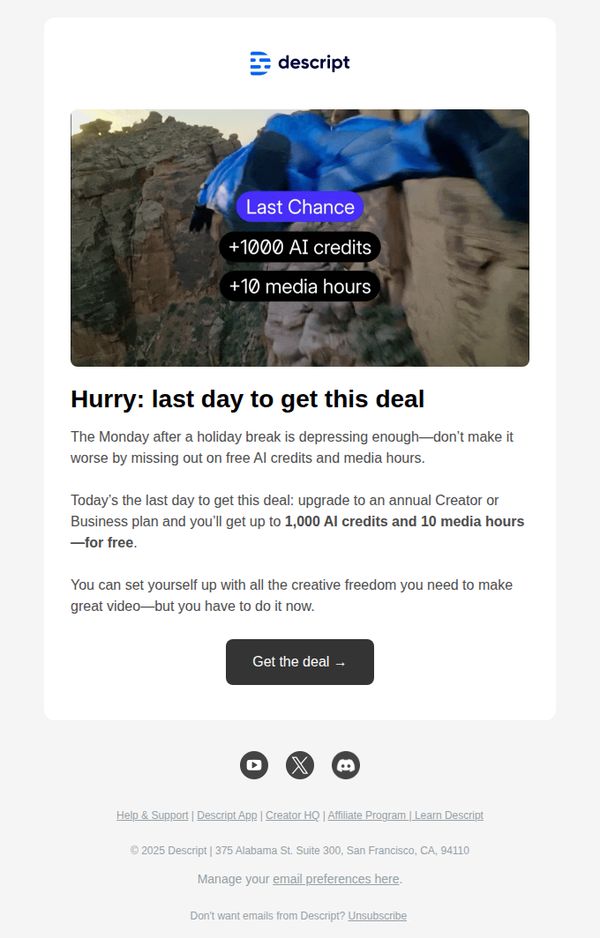
4. Free AI credits, going fast
Objective
The email aims to drive immediate upgrades to Descript’s annual Creator or Business plans by offering a time-sensitive bonus of 1,000 AI credits and 10 media hours, leveraging urgency and post-holiday FOMO to convert free users or trialists.
Why this works
The email brilliantly ties the offer to a psychological trigger, the dread of returning to work after a holiday, making the deal feel like emotional relief rather than just a discount, which increases perceived value and urgency.
How to implement
By front-loading the exact bonus amounts (1,000 AI credits + 10 media hours) in bold, visual overlays on the hero image, the email immediately communicates tangible value without forcing the reader to scroll or decode vague promises.
Pro Tip
Add a small countdown timer or 'Last Chance' badge near the CTA to visually reinforce urgency beyond the headline, since the offer’s time sensitivity is the core motivator but currently relies only on text. • Include a micro-testimonial or social proof snippet (e.g., 'Join 50,000+ creators who upgraded this week') beneath the offer to reduce perceived risk and validate the upgrade decision for hesitant users.
5. In the AI age, what is craft? Here's what we know.
Objective
This email aims to position Descript’s AI editor, Underlord, as a creative collaborator rather than a replacement for human craft, while driving engagement with educational content and new product features. It seeks to reassure users that AI enhances, not erases, professional skill in video editing and content creation.
Why this works
The email brilliantly reframes AI not as a threat to creativity but as a co-pilot that amplifies human intent, by showing real user prompts and Underlord’s thoughtful responses, it builds trust through relatable, conversational examples that feel less like tech demos and more like creative partnerships.
How to implement
Instead of leading with features, it leads with philosophy, asking 'what is craft?', which emotionally anchors the reader before introducing tools, making the product feel like a natural extension of the user’s creative identity rather than just another software upgrade.
Pro Tip
The CTA 'Get the knowledge' is vague and doesn’t reflect the urgency or value of the content; replacing it with something like 'Read the Craft of AI Editing' or 'See How Pros Use Underlord' would better align with the educational intent and increase click-through rates. • The email lacks visual hierarchy between sections, adding subtle dividers, consistent spacing, or a progress indicator (e.g., 'Section 1 of 5') would help users mentally navigate the long-form content and reduce scroll fatigue, especially since the email blends education, product updates, and thought leadership.
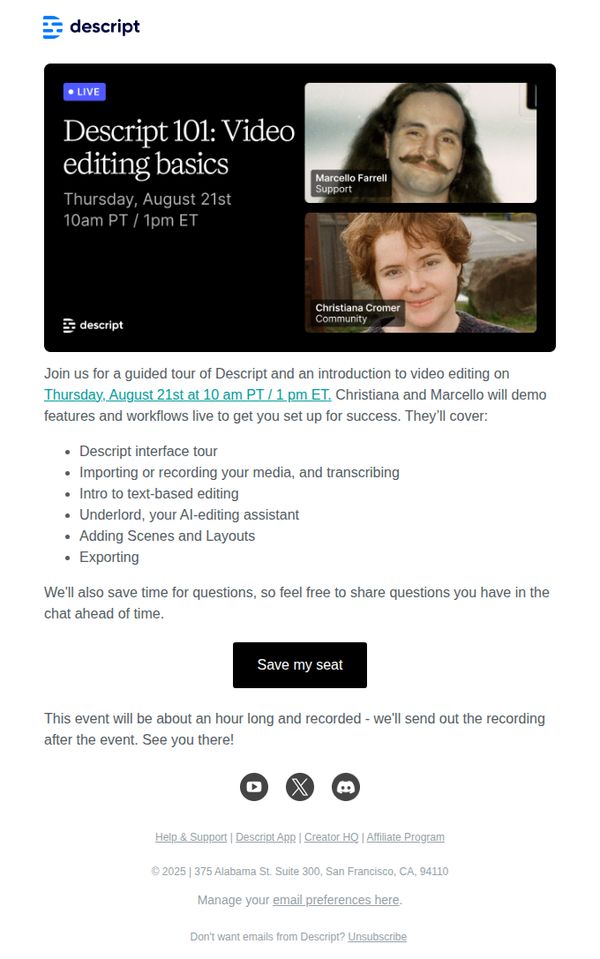
6. Live demo: Learn the basics of video editing with Descript
Objective
This email aims to drive registrations for a live, educational demo that introduces new users to Descript’s video editing tools through a guided walkthrough led by product experts, while also positioning the platform as approachable and supportive for beginners.
Why this works
The email smartly frames the live demo as a beginner-friendly ‘101’ session, lowering the barrier to entry by signaling it’s designed for those new to video editing, which builds trust and reduces intimidation for potential users.
How to implement
By naming the presenters and their roles, Support and Community, it humanizes the brand and subtly reassures recipients they’ll get real, relatable guidance rather than a generic sales pitch, increasing perceived value and attendance likelihood.
Pro Tip
Add a countdown timer or urgency indicator near the CTA to nudge procrastinators, since the event is time-bound, visual scarcity would reinforce FOMO and boost registration conversions. • Include a short testimonial or social proof snippet from a past attendee (e.g., ‘92% of attendees said they felt confident editing after this session’) to validate the session’s effectiveness and reduce skepticism.
7. The easiest way to get started with Underlord
Objective
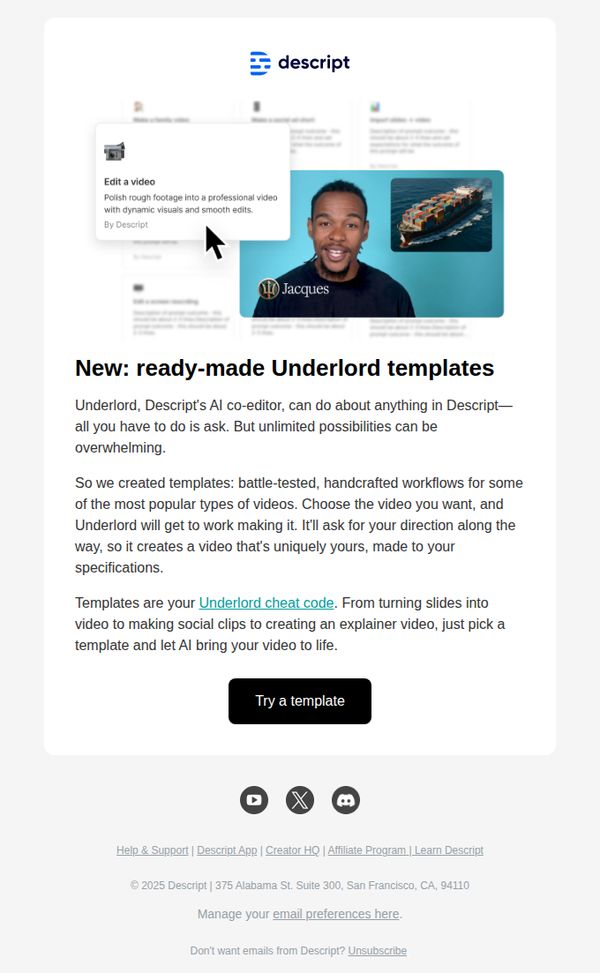
To introduce and drive adoption of Descript’s new ready-made Underlord templates by positioning them as the simplest entry point for users overwhelmed by AI video creation options. The email aims to convert curiosity into action by reducing perceived complexity.
Why this works
The email brilliantly reframes AI complexity as a solvable problem by introducing templates as a ‘cheat code’, a clever, relatable metaphor that instantly lowers the psychological barrier to entry for new users.
How to implement
By featuring a real user named Jacques alongside a visual example of AI-enhanced video editing, the campaign creates social proof and tangible outcomes, making abstract AI capabilities feel personal, achievable, and immediately useful.
Pro Tip
Add a subtle countdown timer or urgency cue near the CTA to nudge procrastinators, since templates are new, implying limited-time access or early adopter perks could boost conversion without feeling pushy. • Include a micro-testimonial or stat (e.g., 'Used by 10,000+ creators') directly under the CTA to reinforce trust and social validation at the moment of decision, reducing hesitation before clicking.
8. Welcome to Descript. Let AI do the heavy lifting.
Objective
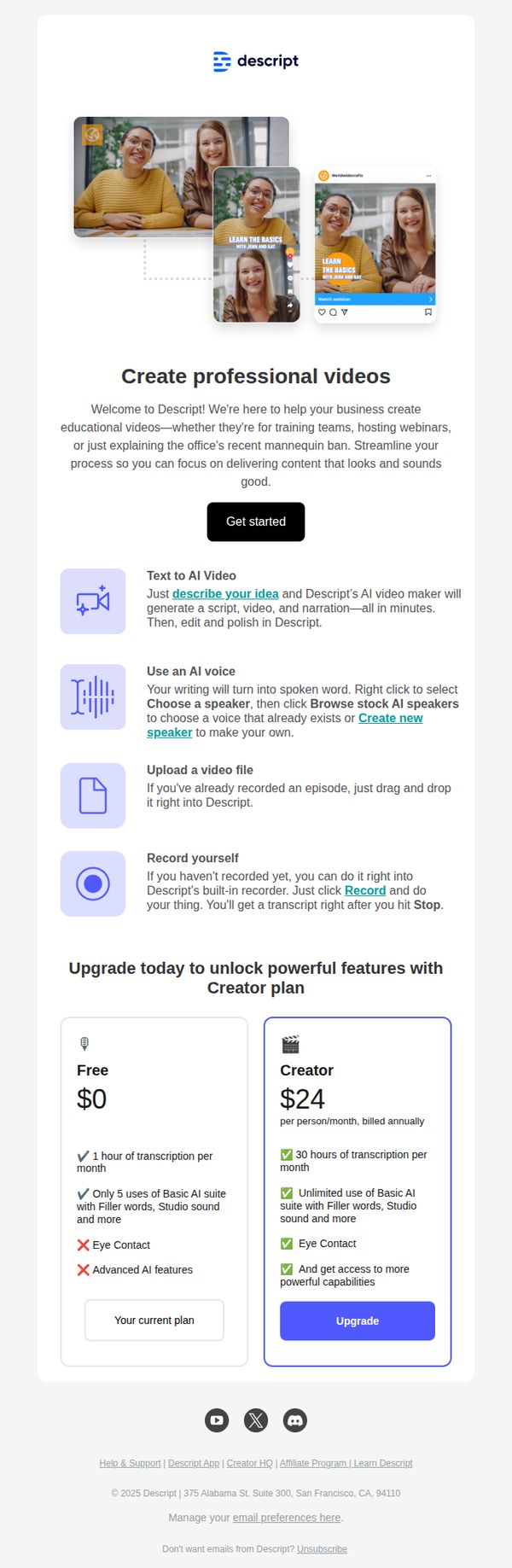
This email aims to onboard new users by introducing Descript’s AI-powered video creation tools and guiding them toward immediate action with a clear 'Get started' CTA. It also encourages upgrading to the Creator plan by highlighting feature differentiators and value.
Why this works
The email brilliantly frames AI as a productivity partner by positioning it to handle the 'heavy lifting' of video creation, which immediately reduces user intimidation and aligns with the pain points of busy professionals.
How to implement
By breaking down the creation process into four simple, icon-led steps, from idea to recording, the email demystifies complex workflows and makes the tool feel instantly approachable for beginners without oversimplifying its power.
Pro Tip
Add a short video demo or animated GIF in the hero section to visually demonstrate the AI video creation process, this would reinforce the 'Let AI do the heavy lifting' promise and increase engagement for visual learners. • Include a testimonial or user quote near the plan comparison to build social proof around upgrading, for example, 'Upgrading to Creator saved me 10 hours/month on editing' would strengthen perceived value.
9. Now in Descript: Underlord turned loose, mobile uploads, Brand Studio

Objective
This email aims to inform existing Descript users about the latest product updates released in July 2025, encouraging them to explore new features like Underlord beta, Brand Studio, and mobile uploads while driving engagement through demos, trials, and community interaction.
Why this works
The email brilliantly frames each new feature as a narrative milestone, like 'Underlord turned loose', making technical updates feel like exciting plot twists in a product story, which keeps users emotionally invested in the platform’s evolution.
How to implement
By embedding direct CTAs like 'Try it now' and 'Register here' immediately after explaining each feature’s value, the email creates frictionless pathways for users to act, turning curiosity into immediate engagement without requiring extra navigation or decision fatigue.
Pro Tip
Add a visual progress bar or checklist near the top indicating how many new features the user has tried, to gamify exploration and nudge users toward completing all feature trials. • Include a short testimonial or user quote under each major feature section to build social proof and reduce perceived risk for users hesitant to adopt beta tools like Underlord or Control Room.
10. How to generate AI video you actually need

Objective
This email aims to drive engagement with Descript’s new generative video features by showcasing practical use cases, demystifying AI video models, and encouraging users to try the tool or attend a live demo. It positions Descript as the go-to platform for purposeful, brand-aligned video creation, not just novelty content.
Why this works
The email brilliantly reframes AI video from a novelty gimmick into a practical workflow tool by contrasting absurd examples like capybara videos with real-world needs like B-roll and branded animations, making the value proposition instantly relatable to professional creators.
How to implement
By featuring Ramdy, a recognizable internal expert, the email builds trust through personality-driven education, turning a technical feature into a human-led journey that invites users to learn alongside someone who’s already mastered the tool’s creative potential.
Pro Tip
Add a subtle countdown timer or urgency indicator near the 'Register here' CTA for the live demo to increase registration rates by leveraging FOMO, especially since the event date is specific and approaching. • Include a short testimonial or social proof snippet under the 'Get generating' CTA, such as 'Used by 10,000+ creators to generate custom B-roll', to reduce perceived risk and reinforce credibility before the user commits to trying the tool.